واضح و شفاف.gif ":دی")
Step 1. Right click on the speaker icon by the clock in the lower right, and select Recording Devices.
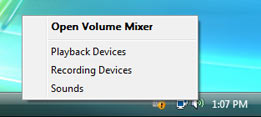
Step 2. Your screen will likely look something like this. Notice only two items here.

Step 3. Right click in the 'blank area' and select Show Disabled Devices.

Step 4. Now you may have a lot more items in the list. Find one called What U Hear or Stereo Mix.

Step 5. Right click on the one you found, and select Enable.

Step 7. Next, right click on it again and select Set as Default Device.
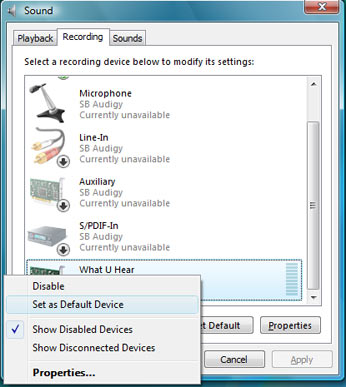
Step 8. Done! YAY!

If you have more tips or find other neat things to do with this, post it here.
If you have questions or problems not covered here, start a new thread, don't reply to this. It will help you get a speedier answer.
منبع
کد:
برای مشاهده محتوا ، لطفا وارد شوید یا ثبت نام کنید



 نوشته شده توسط smoking


.gif "N Aggressive (33)")
.gif "N Aggressive (4)")
.gif "N Aggressive (17)")
